

Description
Stop fake and unwanted WooCommerce orders before they happen. Checkout Guard is a WooCommerce fraud prevention plugin that blocks spam orders and suspicious checkouts using simple rules you control, with no external fraud service, no scoring engine, and no monthly fee.
Often you already know what you want to block: a throwaway email domain, a repeat offender’s IP, a country you don’t ship to. Checkout Guard puts those controls directly in your WooCommerce checkout.
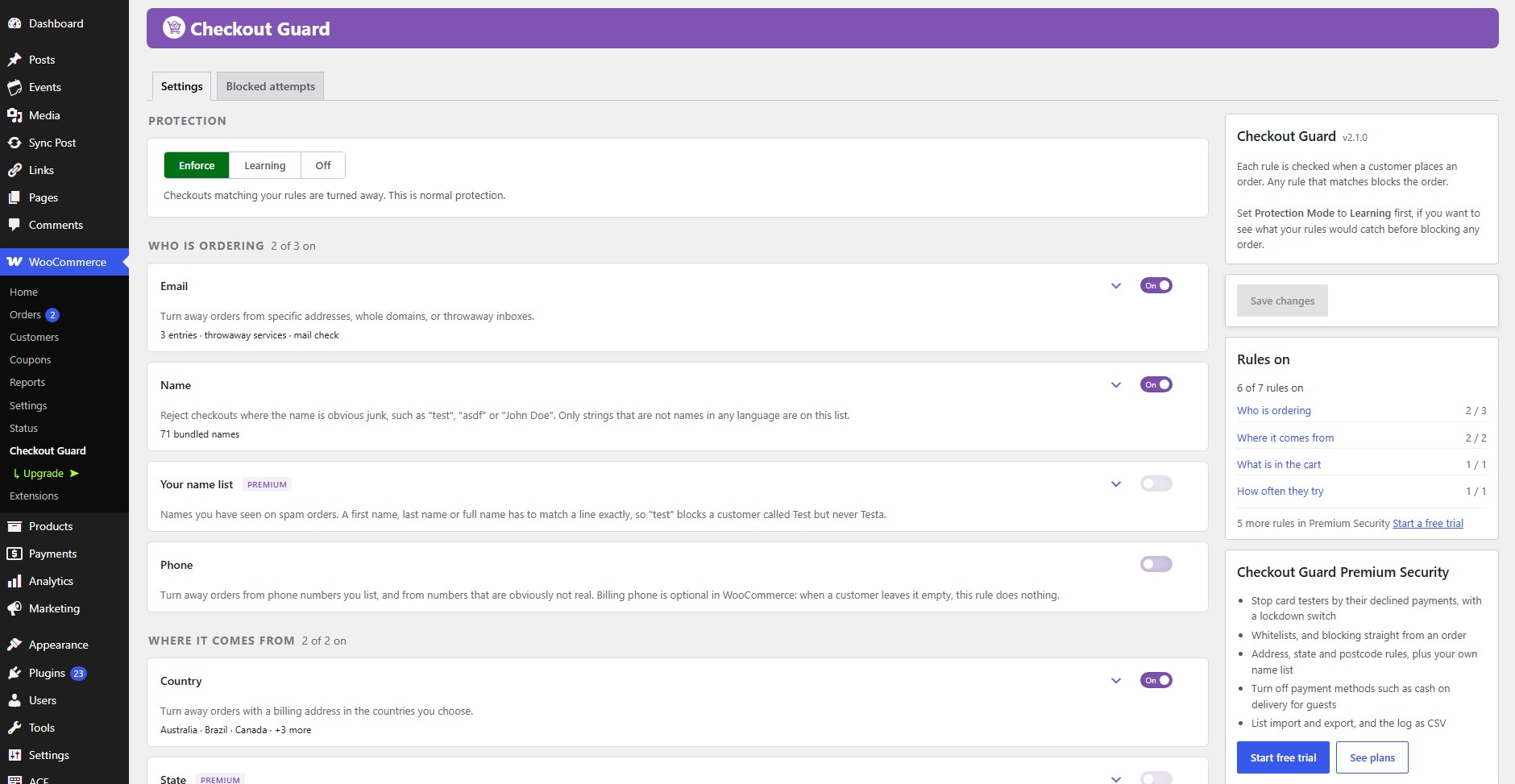
Included in the free plugin: the 22,000-domain disposable-email list, the junk-name check, the mail deliverability check, phone and country blocking, and a checkout attempt limit against card testing. Some WooCommerce fraud plugins sell these as premium features.
Requires: WooCommerce.
Works with: the classic checkout, the WooCommerce Checkout block, most express payment buttons, and HPOS.
🛡️ Block throwaway email services
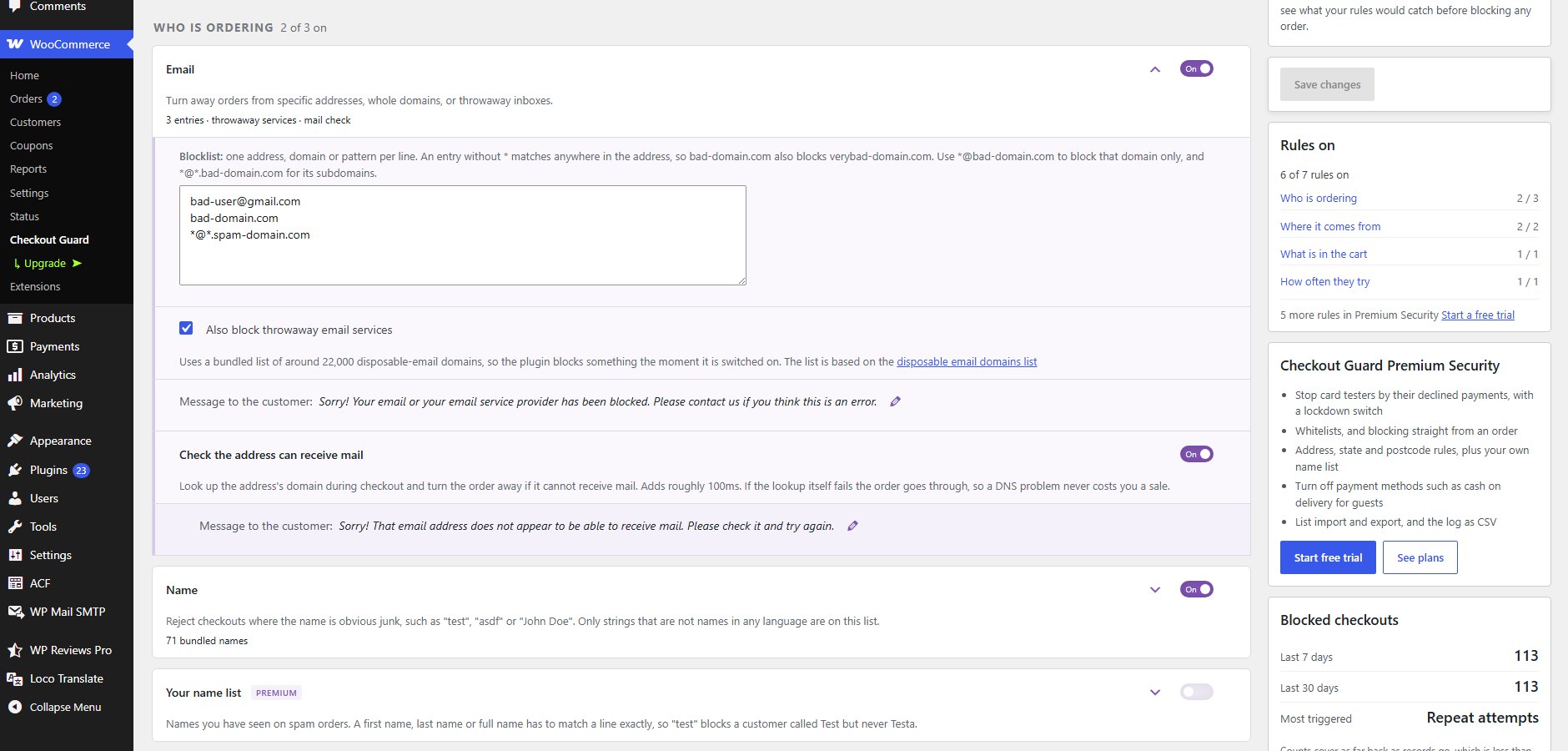
Switch on one setting and Checkout Guard rejects checkouts from around 22,000 known disposable-email domains: Mailinator, Guerrilla Mail, YOPmail, Temp-Mail and thousands more. The list ships with the plugin, so it works the moment you enable it, with no signup and no API key.
🛡️ Block by email address, domain or pattern
Block individual addresses or whole domains, with wildcard support:
*@bad-domain.comblocks every address at that domainspam*@bad-domain.comblocksspammer@bad-domain.combut leavesnice@bad-domain.comalone*@*.bad-domain.comblocks its subdomains, such asmail.bad-domain.com*.edublocks every address ending in that TLD
Catch-all entries such as * or *@* would block every order on your store, so they are rejected when you save.
🛡️ Reject junk names
Catches checkouts where the name is obviously not a name: test, asdf, qwerty, John Doe and similar. Matching is exact and whole-field, so a customer called Testa or Contestabile is never affected by the entry test.
You can read the full list on the settings screen before switching the rule on.
🛡️ Block by phone number
Block numbers you have seen on fraudulent orders, in whatever format the customer types them:
+30 210 1234567blocks that exact international number+234*blocks every number starting with that country code210 1234567blocks the local number however it is written
Optionally reject numbers that are obviously not real, such as 0000000000 or 123456789. Billing phone is optional in WooCommerce, so a customer who leaves it empty is never blocked by this rule.
🛡️ Check that the email can actually receive mail
Optionally look up the address’s domain during checkout and turn the order away if it cannot receive mail at all. If the lookup itself fails, the order goes through, so a DNS problem never costs you a sale.
🛡️ Block by IP address
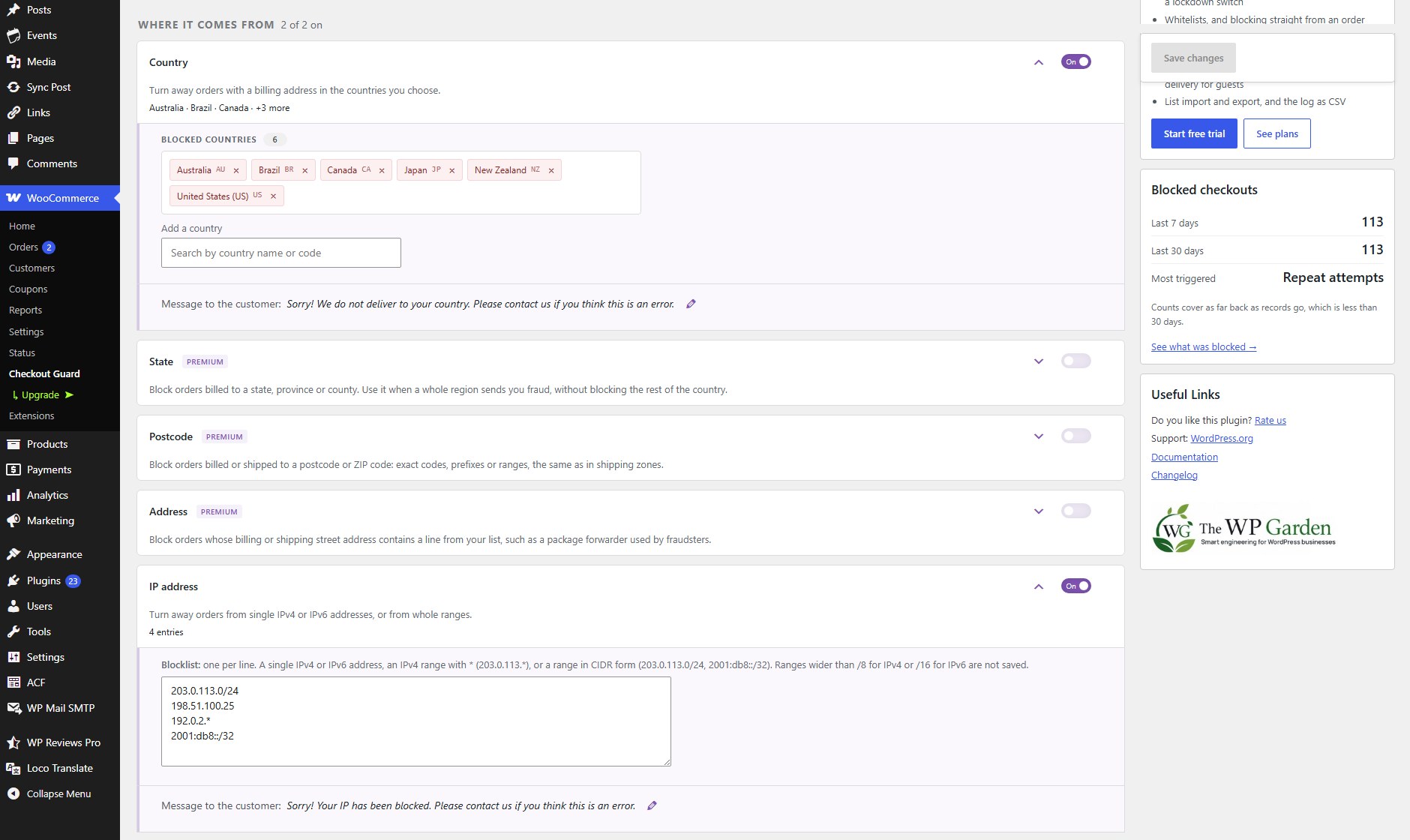
Block individual IPv4 or IPv6 addresses, or cover a whole range with a wildcard or CIDR notation:
203.0.113.*203.0.113.0/242001:db8::/32
Ranges wider than /8 (IPv4) or /16 (IPv6) are not saved, so one line can never block everyone.
Useful when you identify a recurring source of unwanted checkout attempts. If your store sits behind Cloudflare or another proxy, Checkout Guard reads the forwarded visitor IP rather than the edge server’s.
🛡️ Restrict billing countries
Block checkout for billing countries you don’t serve. This is a blocklist: you name the countries to turn away, not the ones to allow.
🛡️ Restrict order totals
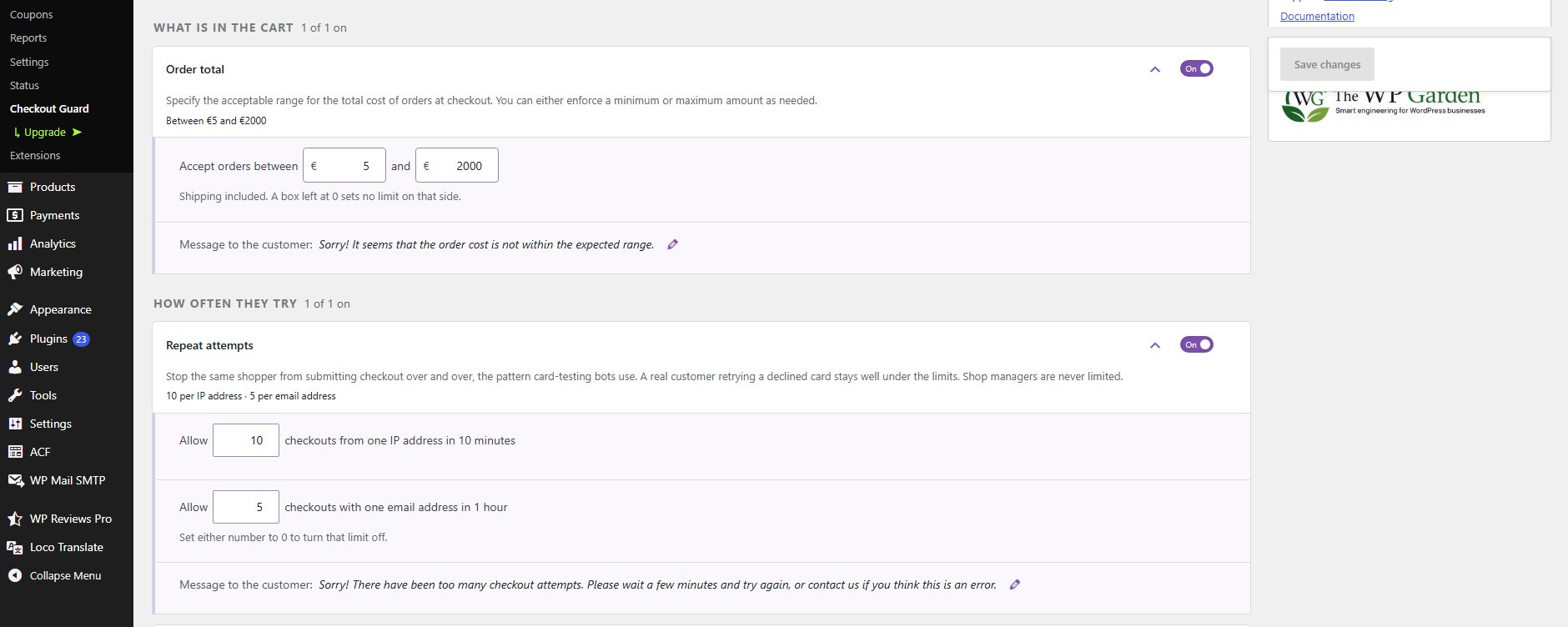
Set a minimum, a maximum, or both, and stop checkouts falling outside the range. Useful against waves of suspicious low-value orders, or unusually large ones worth reviewing by hand.
🛡️ Stop card testing with an attempt limit
Card testers run stolen card numbers through your checkout one after another. Checkout Guard counts checkout attempts and turns a source away once it goes over the limit: by default 10 attempts from one IP address in 10 minutes, or 5 from one email address in an hour. Both limits are adjustable, and shop managers are never limited.
The limit is on for new installs. On an existing store you are asked once whether to switch it on, because a shared office or mobile network can put many real customers behind one IP address.
⭐ Try it before it blocks anyone
Set Protection Mode to Learning and Checkout Guard records what each rule would have caught without turning a single customer away. Check the results, adjust your rules, then switch to Enforce when you are happy. Nothing is blocked until you say so.
📋 See what was blocked
Turn on recording, and the Blocked attempts tab lists every checkout a rule matched: when, which rules, which checkout, the email, the IP, and the cart total. A summary shows how many were stopped in the last 7 and 30 days and which rule fires most often.
Records are pruned automatically so the table never grows without limit.
🛒 Works with WooCommerce checkout and express payments
Checkout Guard enforces on the classic WooCommerce checkout, the WooCommerce Checkout block, and express checkouts.
Wallet buttons placed on a product or cart page skip the checkout form entirely, so they are an easy route for a blocked customer to slip through. Checkout Guard checks the ones that create their order through WooCommerce, Apple Pay included. One known exception is described in the FAQ.
It also declares compatibility with High-Performance Order Storage (HPOS).
⚡ Designed to stay out of the way
Checks run during checkout validation, not on normal browsing, so regular customers shop at normal speed. The bundled domain list is only loaded into memory when you actually enable it.
⭐ Checkout Guard Premium Security
Everything above is free and stays free. Premium Security adds tools for stores that are already dealing with fraud:
- Declined-payment blocking: after repeated declined payments from one IP or email address, that shopper cannot check out for a while. An Unblock panel lifts a block in one click.
- Checkout lockdown: close checkout to everyone, or to guests only, for an hour during an attack.
- Attack alerts: one email when blocked checkouts suddenly pile up, plus an optional daily summary.
- Always allow lists: trusted email addresses and IP addresses that skip every rule.
- Block from an order: add an order’s email, IP and phone to your blocklists from the order screen, or from many orders at once.
- More rules: your own name list, street address, state and postcode. Street address and postcode check the shipping address as well as the billing one.
- Restrict payment methods: hide cash on delivery or bank transfer from guests or first-time customers.
- Import and export: move every list to another store as one file, and download the blocked attempts log as CSV.
Premium Security comes with a 7-day free trial, no card required.
💻 Developer hooks, filters and actions
Rules live in a filterable registry, so developers can add custom rules, change the bundled lists, or adjust matching through filters and actions. If you need a hook that is not there yet, ask in the support forum.
Documentation and support
📖 Documentation: setup and a guide for every rule, from blocking emails and domains to order total limits and the developer hooks.
🛟 Support forum: questions and bug reports. We answer every topic.
✉️ Contact us: anything that is not a support question.
Like it?
A 5-star review is the most useful thing you can do for a small plugin. It takes a minute and helps other store owners find it.
More from The WP Garden
Checkout Guard is made and maintained by The WP Garden, small focused plugins for WooCommerce, BuddyPress and WordPress.
- Terms and Conditions per Product: a required Terms checkbox per product.
- SubPortal: a self-service portal for WooCommerce Subscriptions.
- Pinned Feed Notices: pinned announcements on the BuddyPress activity feed.
- Block Member Posting: stop chosen members posting on BuddyPress.
- Peter’s Post Notes: admin notes on posts and pages.
Screenshots

Installation
- In your WordPress admin, go to Plugins > Add New Plugin, search for “Checkout Guard”, then click Install Now and Activate.
- WooCommerce must be installed and active.
- Go to WooCommerce > Checkout Guard, set Protection Mode to Learning, and switch on the rules you want. Move to Enforce once the Blocked attempts tab shows they catch only what you expect.
The setup and requirements guide walks through the same steps in detail.
FAQ
-
Will this block real customers by mistake?
-
Set Protection Mode to Learning first. Every rule runs and records what it would have caught, but nothing is blocked and no customer is turned away. When the results look right, switch to Enforce.
-
Which disposable email domains are blocked?
-
Around 22,000, bundled with the plugin and based on the public disposable email domains list. The settings screen links to the source so you can check any domain. It is a copy taken when the plugin was released, so it will not match the source exactly.
-
Are forwarding services like Firefox Relay blocked?
-
No. Firefox Relay, Apple Hide My Email and Addy deliver to a real permanent inbox, so blocking them would reject a paying customer. They are excluded from the bundled list.
-
Will the junk-name rule block someone whose surname is Test?
-
No. Matching is exact and whole-field, never a substring, so
testblocks a customer who types “Test” as their whole name but never affects Testa, Contestabile or Testani. The full list is shown on the settings screen so you can check it before switching the rule on. -
How do I block an entire domain instead of just one email?
-
Enter
*@bad-domain.comon its own line in the email blocklist. That blocks every billing email at that domain, and nothing else.You can also enter the bare domain,
bad-domain.com. The difference is precision: a bare domain matches anywhere in the address, so it will also catchsomeone@notbad-domain.com. The*@form matches the domain exactly. Prefer the wildcard unless you specifically want the looser match. -
How do I block a domain and all its subdomains?
-
Enter two lines:
*@bad-domain.comfor the domain itself and*@*.bad-domain.comfor every subdomain under it, such asmail.bad-domain.comorx.y.bad-domain.com. Neither line touchesnotbad-domain.com. -
What wildcard patterns can I use in the email blocklist?
-
The
*wildcard stands for any run of characters, and the pattern must match the whole address:*@bad-domain.comblocks every address at that domain.spam*@bad-domain.comblocksspammer@bad-domain.combut leavesnice@bad-domain.comalone.*@*.bad-domain.comblocks every subdomain, such asmail.bad-domain.com, but notbad-domain.comitself.*.edublocks every address ending in that TLD.
Catch-all entries such as
*or*@*would block every order on your store, so they are rejected and removed when you save. -
Does the IP address block support wildcards and ranges?
-
Yes.
203.0.113.*covers that whole IPv4 range. Each*stands for one whole number, so192.168.*.1covers 192.168.7.1 but not 192.168.7.2, and the first number must be written out. For IPv6, or for ranges that do not end on a dot, use CIDR notation:203.0.113.0/24,198.51.100.128/25,2001:db8::/32. IPv6 addresses match however they are written, so2001:db8::1also blocks2001:0db8:0:0:0:0:0:1. -
Does it work behind Cloudflare?
-
Yes. Checkout Guard reads forwarded proxy headers by default, so IP rules match the real visitor rather than the CDN edge. If your store is not behind a proxy you can switch that off in Store setup.
-
Can I only allow certain countries instead of blocking?
-
Not currently. The country rule is a blocklist: you list the countries to turn away.
-
Does it work with the Checkout block?
-
Yes. The classic checkout, the WooCommerce Checkout block and express checkouts are all enforced, with one known exception noted below, and the plugin declares HPOS compatibility.
-
Apple Pay is, including on product and cart pages. The WooCommerce PayPal Payments gateway sends it through WooCommerce’s own checkout, so every rule runs and a blocked attempt is stopped before the order is created.
Express buttons in general are checked whenever the gateway creates its order through WooCommerce. WooPayments is covered in full: its Apple Pay, Google Pay, Link and WooPay buttons all place the order the same way the Checkout block does, so every rule runs wherever you put the button. A blocked attempt leaves nothing in your orders list.
There is one known exception. WooCommerce PayPal Payments has a setting called “Pay Now Experience”, which lets customers skip the Order Review page and is switched on for new merchants during its setup. With it on, the PayPal button on a product or cart page builds the order itself without going through WooCommerce’s checkout, and Checkout Guard does not see those orders. Support for them is planned. In the meantime, switching “Pay Now Experience” off in the PayPal settings sends those customers through the checkout page instead, where every rule runs. Apple Pay is unaffected either way.
-
Will this plugin slow down my store frontend?
-
No. Checks run during checkout validation, not on normal browsing, so browsing speed is unaffected. The bundled disposable-domain list is only loaded when you enable it, and the optional deliverability lookup is the only rule that touches the network.
-
Does it stop card testing?
-
The free attempt limit turns away a source that tries checkout too many times in a short window, which is how card testing looks from the store. Checkout Guard Premium Security also reacts to declined payments, the clearest sign of card testing, and can close checkout for an hour during an attack.
-
Does it store customer data?
-
Only if you switch recording on, and it is off by default. When enabled, each blocked attempt (and, in Learning mode, each attempt that would have been blocked) stores the billing email, IP address, first and last name, country, postcode and phone number, the cart total and product IDs, the customer’s account if they were logged in, and which rules matched. Repeat attempts from the same source within 10 minutes are kept as one record with a count. Records are deleted automatically after the retention period you choose, 90 days by default.
Deleting the plugin from the Plugins screen always removes its tables, including every record of blocked checkouts. Your settings are kept, so a reinstall picks up your rules, unless you switch on Delete settings on uninstall in Store setup.
The attempt limit keeps short-lived counters so it can count attempts. They are stored as hashes rather than readable email or IP addresses, and are cleared out daily once their time window has passed. In Premium Security, a shopper blocked for declined payments is listed by IP or email address on the Blocked attempts tab until the block expires, so you can see and lift it.
-
Does it send data anywhere?
-
Checkout itself never calls an outside service, with one exception you switch on yourself: the mail deliverability check looks up the email domain in DNS.
Licensing and the Premium Security trial run on Freemius. When you activate the plugin, it asks whether you want to share basic diagnostic information with Freemius, such as your site address, WordPress and PHP versions, and the admin email address, to receive security and feature updates. Skip it and nothing is sent. You can change your mind later from the Plugins screen.
-
Where is the documentation?
-
At thewpgarden.com/docs/checkout-guard: setup, plus a guide for each rule.
-
How do I get support?
-
Open a topic in the WordPress.org support forum. For anything else, contact us.
-
Can I translate Checkout Guard?
-
Yes. You can translate Checkout Guard into your language on translate.wordpress.org.
Reviews


Contributors & Developers
“Checkout Guard – Block Fake Orders, Spam & Fraud for WooCommerce” is open source software. The following people have contributed to this plugin.
Contributors

Translate “Checkout Guard – Block Fake Orders, Spam & Fraud for WooCommerce” into your language.
Interested in development?
Browse the code, check out the SVN repository, or subscribe to the development log by RSS.
Changelog
2.1.1
- Fix: shop managers can open the Checkout Guard settings screen. Before, it was shown to administrators only, although the menu entry and the notices were meant for anyone who manages WooCommerce
- Premium Security: fix, a payment method switched off in WooCommerce keeps its Hide tick when you save Checkout Guard. Before, the tick was lost, so the method showed to everyone once it was switched back on
- Developer: fix, a
cgbs_block_by_total_cost_minorcgbs_block_by_total_cost_maxfilter returning0.0,'0'or an empty string now turns that bound off, as0does. Before, a maximum of0.0blocked every order - Fix: an IP blocklist wildcard needs a fixed first number, so the widest is
1.*.*.*, the same limit CIDR ranges have.*.*.*.*is no longer saved, and a saved one stops blocking every checkout - Fix: a
*in an IP entry stands for one whole number.192.168.*.1covers 192.168.7.1 and no longer every address from 192.168.0.1 to 192.168.255.1. Entries ending in*match as before. The Premium Security Always allow list uses the same matching - Fix: IPv6 wildcards such as
2001:db8::*are no longer saved; they never matched anything. Use CIDR for IPv6 ranges - Fix: an IPv4 visitor reported in IPv6 form (
::ffff:203.0.113.5) now matches wildcard entries, as it already matched exact and CIDR ones - Fix: email and IP entries that differ only by spaces are saved once
- Tweak: saving an email pattern that blocks a whole domain ending, such as
*.com, shows a warning. The entry is kept - Fix: the default messages customers see can now be translated. A message you never changed follows the store’s language, including ones saved by earlier versions
- Tweak: the default Country message no longer says “We do not deliver to your country”, since the rule checks the billing country. It now reads “We cannot accept orders from your country”
- Premium Security: the checkout lockdown message can be changed on the settings screen
- Premium Security: declined payments are no longer counted while Protection is off, for shop managers, or for customers on the Always allow list. Learning mode still counts them, and the Blocked attempts tab says those shoppers can still check out
- Premium Security: customers on the Always allow list now see every payment method, as they skip every other rule
- Premium Security: a checkout stopped only by your own lockdown no longer counts towards an attack alert
- Premium Security: the Declined payments setting reads as one sentence, and its time window follows the
cgbs_decline_windowfilter - Tweak: wording fixes on the order screen box and in the Premium Security previews
- Tweak: when you save, any list line that was not valid and was not saved is named in a notice, for the email, IP and phone lists and every Premium Security list
- Fix: apostrophes in customer messages and email entries are saved as typed. Before, “Don’t” was saved and shown to customers as “Don\’t”
- Fix: list entries are split on any line break, so lists saved from code or another system keep one entry per line
- Fix: domains with internationalised endings (such as
.xn--p1ai) are accepted in the email blocklist and the Always allow list - Fix: the email blocklist warning now also covers country endings such as
*@*.co.ukand*.com.au - Fix: a store that never saved its settings shows the attempt limit switched on, as a new install has it
- Premium Security: Always allow refuses email patterns covering a whole country ending, such as
*@*.co.ukor*@*.com.au.*@*.yourshop.co.ukstill works. A saved pattern like that is removed the next time the settings are saved - Premium Security: the postcode rule checks a US ZIP+4 (
90250-1234) against your 5-digit entries and ranges as well. A country prefix must be a real country (XX:123is not saved) - Premium Security: the log CSV’s Outcome and Checkout columns use the same words as the screen (Blocked, Let through (Learning), Classic checkout). The Mode column is now called Outcome
- Premium Security: a notice tells you when a Premium Security trial has ended without a purchase, and that your free rules are still blocking
- Docs: the FAQ and the “Log blocked checkouts” setting now list everything a log record stores
2.1.0
- Feature: IP ranges in CIDR form for IPv4 and IPv6 (
203.0.113.0/24,2001:db8::/32), in the blocklist and the Premium Security Always allow list. Ranges wider than /8 (IPv4) or /16 (IPv6) are not saved - Fix: an IPv6 address now matches however it is written, so
2001:db8::1also blocks2001:0db8:0:0::1 - Premium Security: the street address and postcode rules also check the shipping address
- Premium Security: a clearer checkout lockdown box: icons on its buttons, and a status panel saying who is locked out and when checkout reopens
- Premium Security: the sidebar’s support link points to email support (support@thewpgarden.com) while a licence or trial is active
- Docs: how to block a domain’s subdomains (
*@*.bad-domain.com) - Tweak: Checkout Guard sits higher in the WooCommerce menu, right after Status
- Premium Security: fix, declined payments on the Checkout block are now counted. Before, only the classic checkout counted them, so declined-payment blocking never triggered on the block checkout
- Premium Security: the attack alert email now says its breakdown covers the last hour, which is why it can list more checkouts than its 10-minute count
- Fix: the sidebar’s “Blocked checkouts” counts and “Most triggered” no longer include attempts Learning mode let through. Those are shown on a line of their own
- Premium Security: fix, Unblock also clears that shopper’s decline count, so their next declined payment no longer blocks them again straight away
2.0.0
- Feature: Checkout attempt limit against card testing, per IP address and per email address. On for new installs; existing stores are asked once before it is switched on
- Feature: Block by phone number: exact numbers, country-code prefixes such as
+234*, or local numbers in any format, plus an optional check for obviously fake numbers - Feature: Repeated blocked attempts from the same source are grouped into one log row with an attempt count, so an attack cannot flood the log
- Feature: Checkout Guard Premium Security, with a 7-day free trial: declined-payment blocking with an Unblock panel, checkout lockdown, attack alert emails, always-allow lists, blocking from the order screen, name list, address, state and postcode rules, payment method restrictions, list import and export, and log CSV export
- Feature: “Delete settings on uninstall” in Store setup removes every setting and list when the plugin is deleted. Off by default, so a reinstall keeps your rules
- Change: The settings screen is about half as long. Each rule shows as one line with a summary of what it is set to, and opens with its arrow. Customer messages, Always allow, Store setup and Payment methods fold away until you open them
- Change: Save stays in view as you scroll, shows how many changes are unsaved, and warns before you leave the page with changes that are not saved
- Change: Order total and attempt limits read as sentences, with the store currency, such as “Accept orders between $30 and $230”
- Change: The Premium Security settings are visible, read-only, on the free version, with a link to try them
- Fix: A new install showed the junk-name rule as on but did not run it until the settings were saved once. Default settings are now saved the first time the plugin runs
- Fix: Screen readers announced every rule switch as an unnamed checkbox. Each switch is now named after its rule and linked to its explanation
- Fix: The “not recording” hints pointed to a setting that does not exist. They now name “Log blocked checkouts” and link straight to it
- Fix: Behind a CDN, blocked attempts were recorded with the CDN’s address instead of the shopper’s
- Fix: The bundled disposable-list option showed on the settings screen while the email rule was switched off
- Dev: New hooks
cgbs_skip_evaluation,cgbs_save_settings,cgbs_blocked_tab_before_logandcgbs_settings_tab_after_form - Compat: Tested with WooCommerce 11.2
1.2.0
- Feature: Block around 22,000 known disposable-email domains from a bundled list, with forwarding services such as Firefox Relay and Apple Hide My Email deliberately excluded
- Feature: Reject junk names such as
test,asdfandJohn Doe, matched exact and whole-field so real surnames are unaffected. The full list is readable on the settings screen - Feature: Optional mail deliverability check that turns away addresses whose domain cannot receive mail. Fails open, so a DNS problem never costs a sale
- Feature: Protection Mode – Learning records what would have been blocked without turning anyone away; Off runs no checks
- Feature: Blocked attempts screen listing every checkout a rule matched, with 7 and 30 day summaries
- Feature: Enforcement on the WooCommerce Checkout block via the Store API. Earlier versions checked the classic checkout only
- Feature: Enforcement on express checkouts. Wallet buttons placed on product and cart pages can build the order without ever reaching checkout validation, so no rule used to run on them at all. Express checkouts that create their order through WooCommerce are now checked like any other checkout, and a blocked one leaves no order behind. See the FAQ for one known exception
- Feature: Setting for stores behind a CDN or proxy, so IP rules match the real visitor
- Feature: Blocked-attempt recording now works and is off by default. Records are kept 90 days unless you choose otherwise
- Change: Settings screen reorganised into grouped cards, with rule explanations shown inline
- Change: Blocked countries are now listed as removable tags, with a search box to add more. Type “kingdom” or “GB” to find United Kingdom. The old control was a 250-row scrolling list that hid your own selection inside it and cleared it if you clicked without holding Ctrl
- Change: The junk-name rule is a top-level rule. In an earlier build it only ran when the email rule was also on
- Change: Settings and Logs links on the plugin row of the Plugins screen
- Dev: Rules moved into a filterable registry (
cgbs_rules), with a surface-agnostic engine and thin adapters per checkout - Compat: Declares High-Performance Order Storage (HPOS) compatibility
1.1.0
- Feature: Wildcard support in the email blocklist (e.g.
*@bad-domain.com,spam*@bad-domain.com,*.edu) - Fix: Fatal error at checkout when the “blocked by IP” message was left empty
- Fix: Wrong fallback message shown for IP blocks
- Fix: Blocklist entries with trailing whitespace are trimmed instead of discarded
- Docs: Corrected the domain blocking FAQ and documented wildcard syntax
1.0.4
- Optimize: Asset Loading
- Update: WordPress Version 7.0.2
1.0.3
- Fix: Issue applying limits for some visitors
- Admin: Changed menu position to WooCommerce submenu
- Update: WordPress Version 6.8.2
1.0.2
- Feature: Add IPv4 wildcards
- Update: WordPress Version 6.8.1
- Fix: Warnings
1.0.1
- Fix: Undefined variable issue
- Styling customizations
- Move to main admin menu
1.0.0
- First Edition release