

Description
A product published without a price, an image or a SKU is a half-finished listing: it sells badly or not at all. SapphireIT Publish Guard stops it at the publish button. It checks every product against a configurable checklist of required fields before it goes live, so incomplete products never reach your customers.
It is product validation for the WooCommerce catalog you already have. A missing SKU, an empty description, a variation without a price or a thin image gallery shows up while you edit, and a product that fails a required check is kept as a draft until it is fixed.
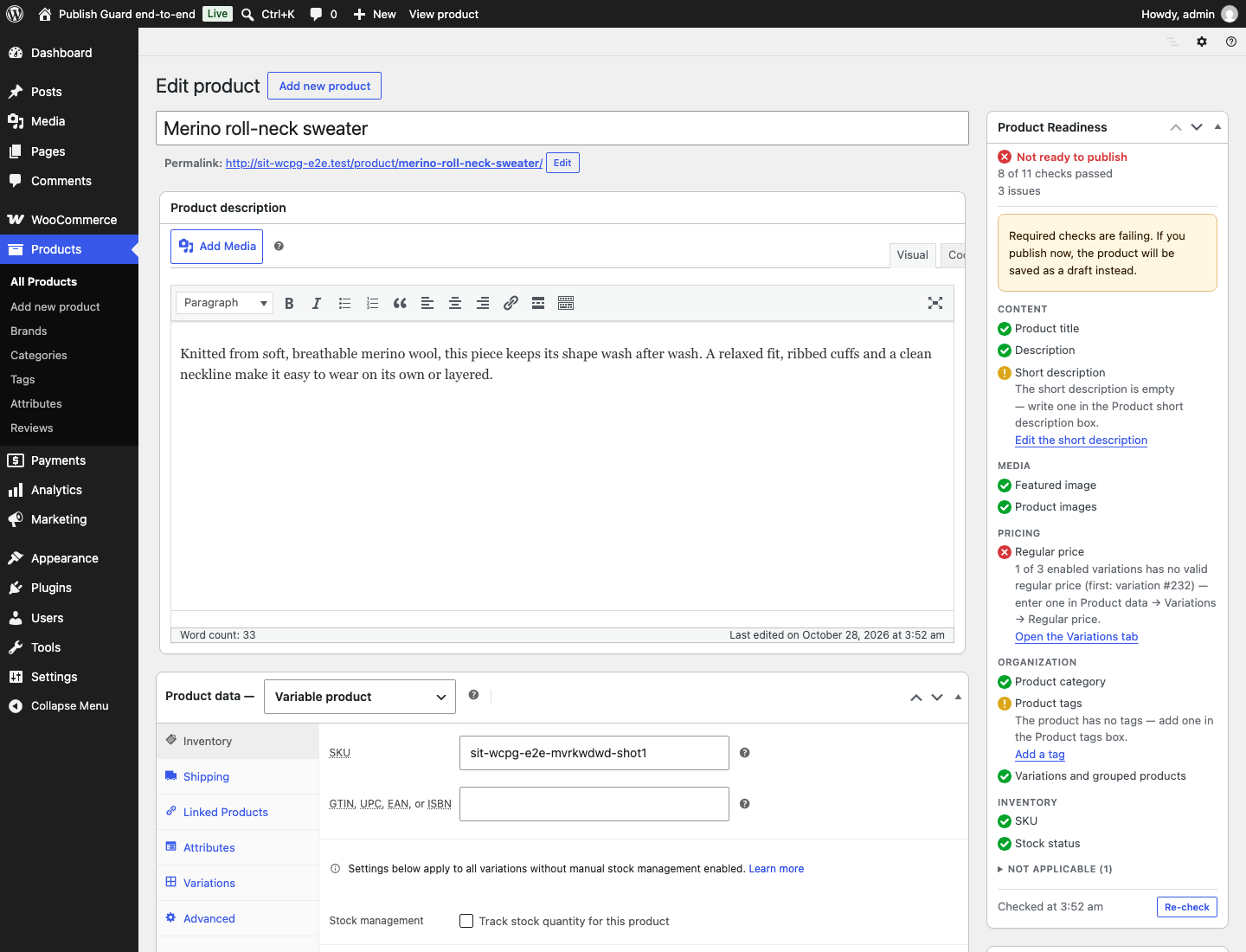
A live checklist in the product editor. A panel in the classic WooCommerce product editor lists every check, grouped by content, media, pricing, organization and inventory. It refreshes on its own as you type, upload images or pick categories. You don’t need to save first. Each failing item links to the field that fixes it.
Twelve built-in checks:
- Product title
- Description (with a minimum length)
- Short description (with a minimum length)
- Featured image
- Product images (a minimum total count)
- Regular price (every enabled variation on variable products)
- Sale price validity (lower than the regular price, sensible dates)
- Product category (warns when only the store default is used)
- Product tags
- Variations and grouped products (a variable product needs an enabled variation, a grouped product a published linked product)
- SKU
- Stock status
Every check knows the product type. Variable products are checked variation by variation. A check that does not apply to a type, such as stock status on an external product, is shown as not applicable with the reason, instead of blocking the product. Every failure says what is missing and where to fix it, for example “Product data Variations”.
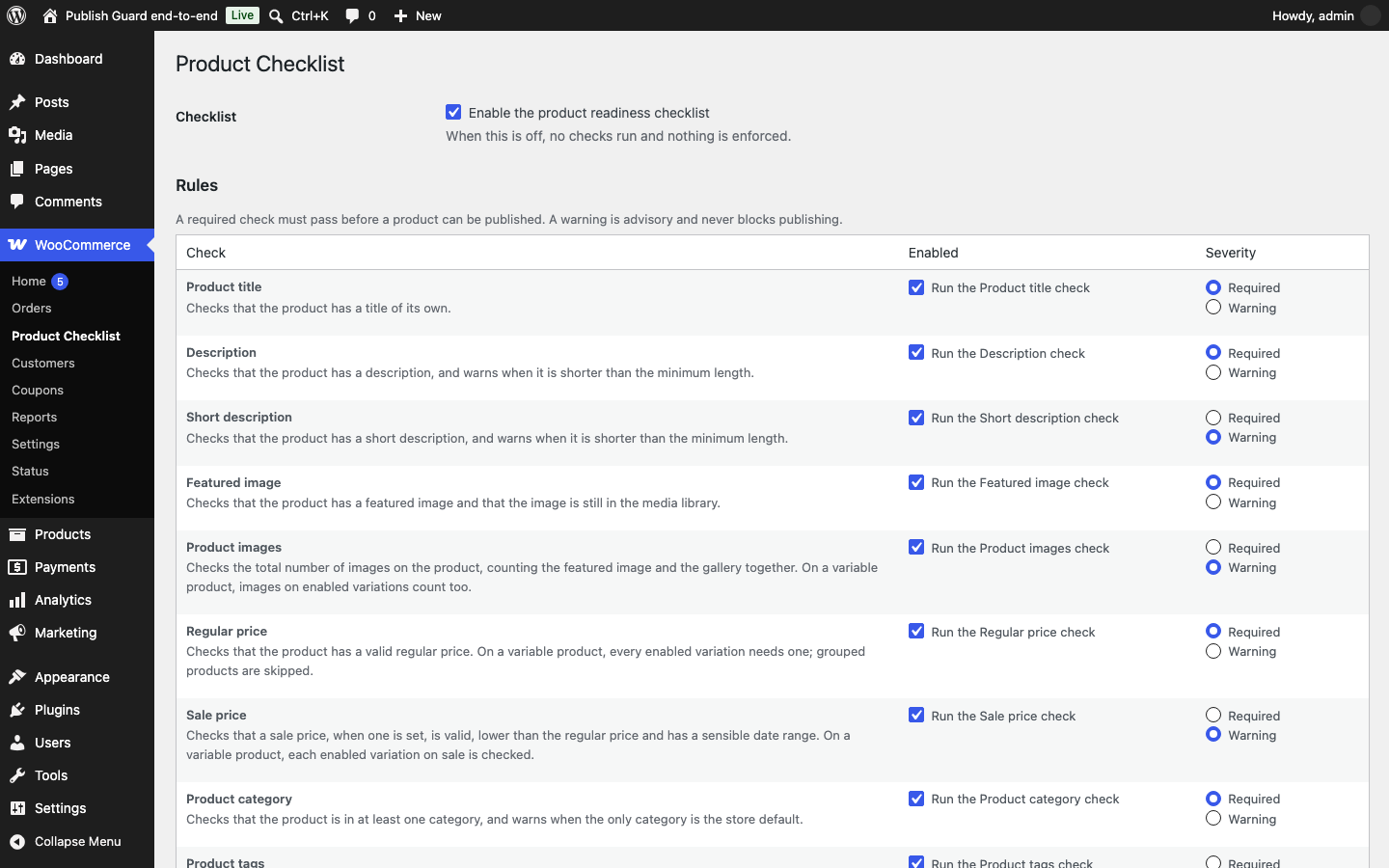
Each check can be turned off, or set to required (it must pass before the product can be published) or warning (advisory only).
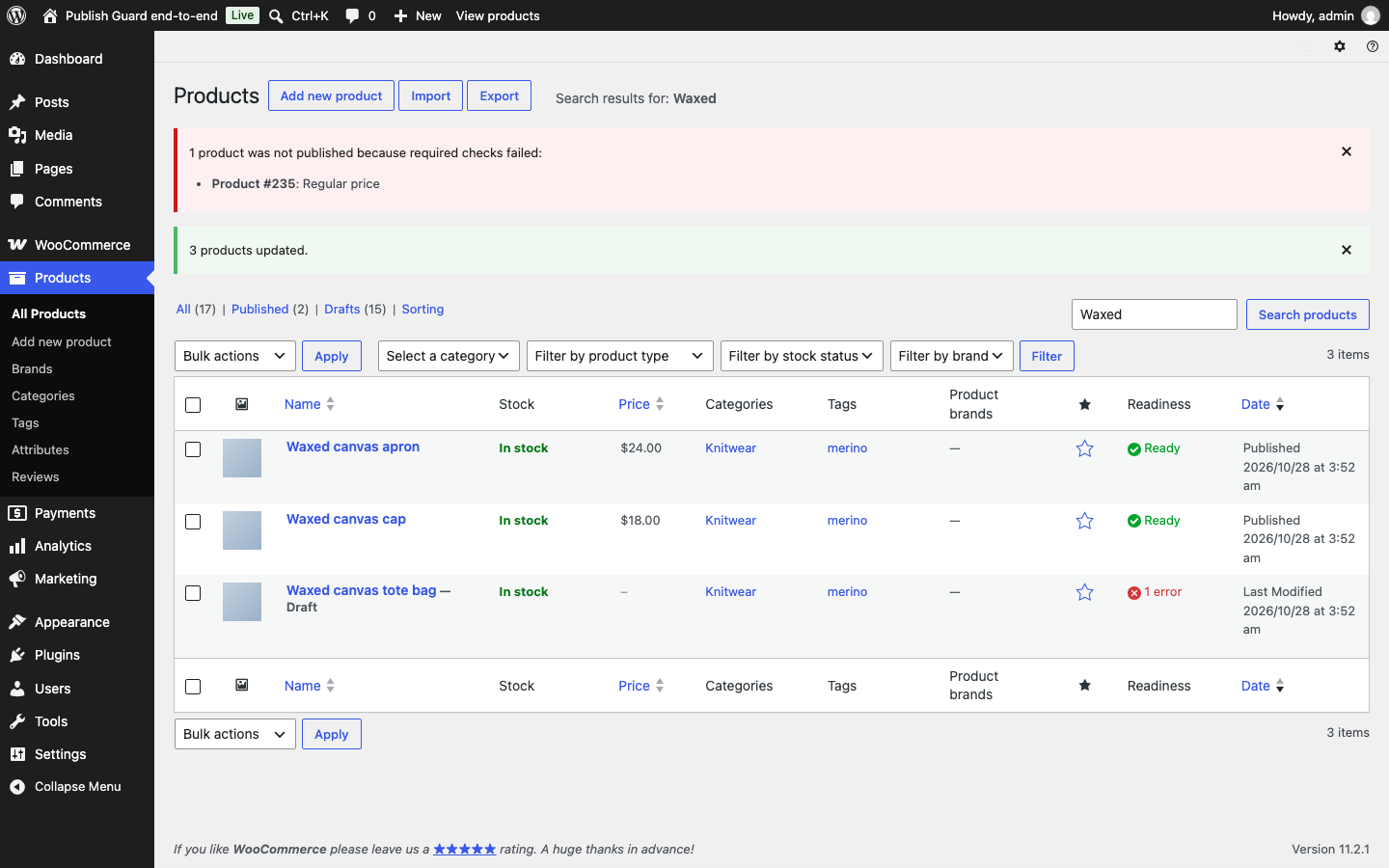
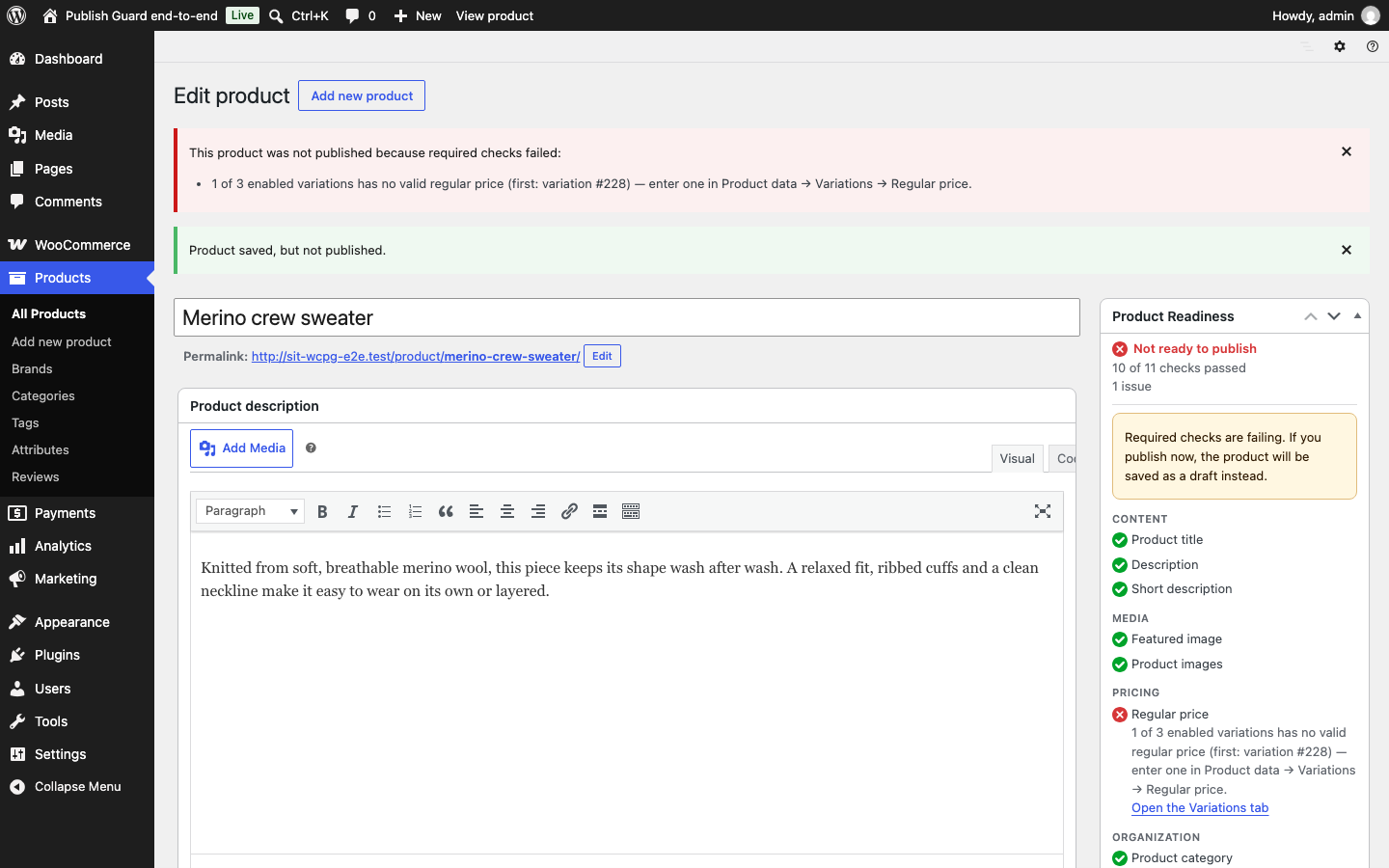
Real enforcement, on the server. When a required check fails, the product is saved as a draft instead of being published, and a notice explains why. This is enforced on the server, so it also covers Quick Edit, Bulk Edit, scheduled publishing, the WooCommerce REST API and code that saves products through WooCommerce. A disabled button in the browser would not be enforcement.
A readiness column in the products list. See at a glance which products are ready and which need work.
Light footprint.
- One settings row, plus a temporary flag that is removed once the welcome notice has been shown. No custom tables, post meta, roles or capabilities.
- Assets load only on the product editor, the products list and the settings screen, and once on the Plugins screen for the welcome notice.
- No outbound network requests, tracking or upsell notices.
SapphireIT Publish Guard for WooCommerce is an independent plugin. It is not affiliated with or endorsed by WooCommerce or Automattic.
Source Code
The editor script in build/ is compiled. Its human-readable React and SCSS sources ship with the plugin in the assets/ folder, and the full development repository is public at https://github.com/rshalihin/sapphireit-publish-guard.
To rebuild the compiled files from source, install Node.js and npm, then run:
git clone https://github.com/rshalihin/sapphireit-publish-guard.gitcd sapphireit-publish-guardnpm installnpm run build
The build uses @wordpress/scripts and writes the compiled files to build/.
Screenshots

Installation
- Install and activate WooCommerce 9.0 or newer.
- Upload the plugin to
/wp-content/plugins/sapphireit-publish-guard, or go to Plugins, then Add New, then Upload Plugin and choosesapphireit-publish-guard.zip. - Activate SapphireIT Publish Guard for WooCommerce.
- Go to WooCommerce, then Product Checklist. Choose which checks run, which are required, the content thresholds and the publishing behaviour.
The settings screen is available to anyone who can manage WooCommerce (administrators and shop managers).
FAQ
-
Does it unpublish products that are already live?
-
No. Enforcement applies only when a product moves into Published or Scheduled. A live product that later fails a check shows the problem in its checklist and in the products list, but it is never taken offline automatically.
-
Can an administrator publish anyway?
-
Only if you allow it. Turn on “Allow users who can manage WooCommerce to publish anyway” on the settings screen. It is off by default, so nobody can publish past a failing required check.
-
Does it block imports, WP-CLI or cron jobs?
-
WP-CLI, cron jobs and requests with no signed-in user are never blocked.
The WooCommerce CSV product importer and REST API clients run as a signed-in user, so their saves are checked like any other. Under the default “All signed-in requests” scope, an imported product that fails a required check is saved as a draft instead of being published. To exempt them, choose “Admin editor screens only” under “Enforcement applies to”.
Variable and grouped products are not blocked because their variations or linked products come later in the import file: “Variations and grouped products” is a warning by default.
Scheduled publishing is the one exception to the cron rule: a scheduled product that fails its required checks when its time comes is returned to draft.
-
Can I limit enforcement to the admin editor screens?
-
Yes. Under “Enforcement applies to”, choose “Admin editor screens only”. The default, “All signed-in requests”, also covers the REST API and code that saves products for a signed-in user.
-
Which product editor does it support?
-
The classic WooCommerce product editor, which from WooCommerce 11.0 is the only one. On WooCommerce 9.x and 10.x, where the product block editor was an optional beta, the checklist panel does not appear in it, but publishing is still enforced, because that editor saves through the WooCommerce REST API.
-
Does it check variations?
-
Yes. Regular price, sale price, SKU and stock status are checked on every enabled variation, and a variable product fails a check when any enabled variation fails it. Disabled variations are ignored. As in WooCommerce, a variation without a SKU of its own passes when the parent product has one.
-
Can it block a variable product that has no variations?
-
Yes. Raise “Variations and grouped products” to Required in the settings. It then also requires a grouped product to link at least one published product. It ships as a warning, so imports that create the product before its variations are never blocked by it.
-
Does it check GTIN, UPC or EAN barcodes?
-
Not in this plugin. The SKU check covers the identifier WooCommerce itself uses.
-
Can I sort or filter the products list by readiness?
-
Not in this version. Readiness is calculated when the list is shown and is not stored.
-
Can developers add their own checks?
-
Yes. Register a rule on the
sit_wcpg_register_rulesaction. It gets a settings row, a checklist row and enforcement automatically. The developer documentation is inREADME.mdinside the plugin folder. -
Does it slow down the products list?
-
The readiness column adds three database queries for a page of simple products, and four for a page that includes variable or grouped products, whatever the page size or the number of variations.
Reviews
There are no reviews for this plugin.
Contributors & Developers
“SapphireIT Publish Guard for WooCommerce” is open source software. The following people have contributed to this plugin.
Contributors
Translate “SapphireIT Publish Guard for WooCommerce” into your language.
Interested in development?
Browse the code, check out the SVN repository, or subscribe to the development log by RSS.
Changelog
1.1.0
- New: variation-level checks. On variable products, regular price, sale price, SKU and stock status are checked on every enabled variation. Disabled variations are ignored.
- New: the “Variations and grouped products” check. A variable product needs at least one enabled variation, and a grouped product at least one linked product that exists and is published. It ships as a warning.
- New: a defined product-type matrix. Every check either applies to a simple, variable, grouped or external product (subscriptions included), or is shown as not applicable with the reason, so no product is blocked by a check that does not apply to its type.
- Improved: every failure message is rewritten to name the field, the tab and the fix. A variation failure gives the first failing variation and opens the Variations tab.
- New: a one-time welcome notice on the Plugins screen after activation, linking to the settings.
- New: a Settings link in the plugin’s row on the Plugins screen.
- New: the settings screen’s footer shows the plugin version and a link to leave a review on WordPress.org.
- Fixed: the validation REST endpoint now refuses ids that are not products.
- Fixed: when one request refused several new products, such as a CSV import, only one of their notices was kept.
- Tested up to WooCommerce 11.2.
1.0.0
- Initial release.
- Live product checklist in the classic product editor, with eleven configurable checks.
- Server-side publishing enforcement covering the editor, Quick Edit, Bulk Edit, scheduled publishing and WooCommerce CRUD and REST saves.
- Readiness column in the products list.
- Settings screen under WooCommerce, then Product Checklist.
- Developer hooks:
sit_wcpg_register_rules,sit_wcpg_validation_result,sit_wcpg_should_enforceandsit_wcpg_can_override_publish_guard.