
Description
PHP 8.2 stops getting security fixes on 31 December 2026. PHP 8.1 and older already get none, and hosts are moving sites to PHP 8.3, 8.4 and 8.5. Before you change the PHP version, you want to know one thing: will my site break?
Upgravo reads the code of every plugin and your theme, on your own server, and gives you a straight answer:
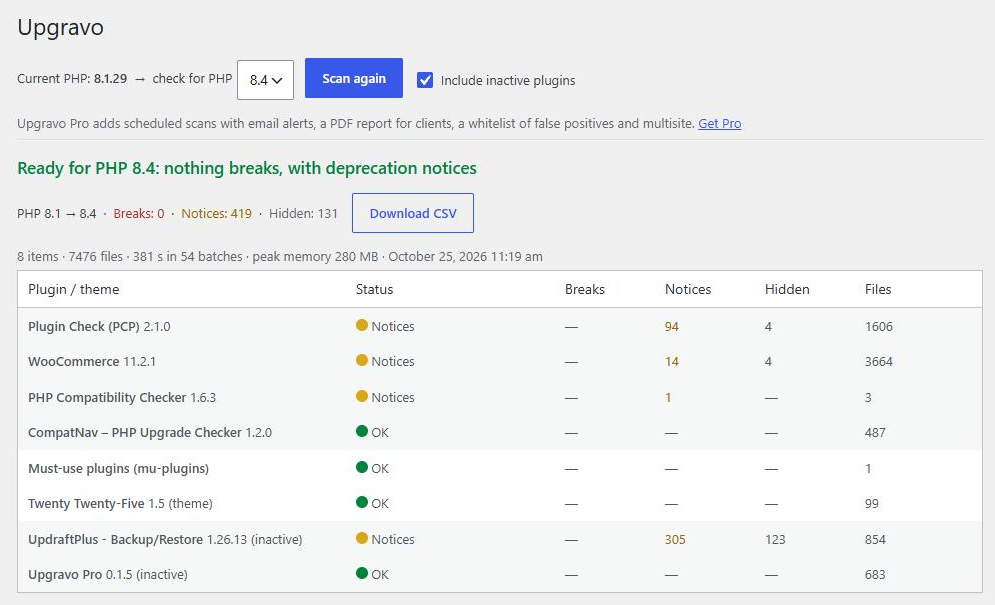
- Ready for PHP 8.4: nothing breaks — or Not yet: something active breaks, with the exact plugin, file and line.
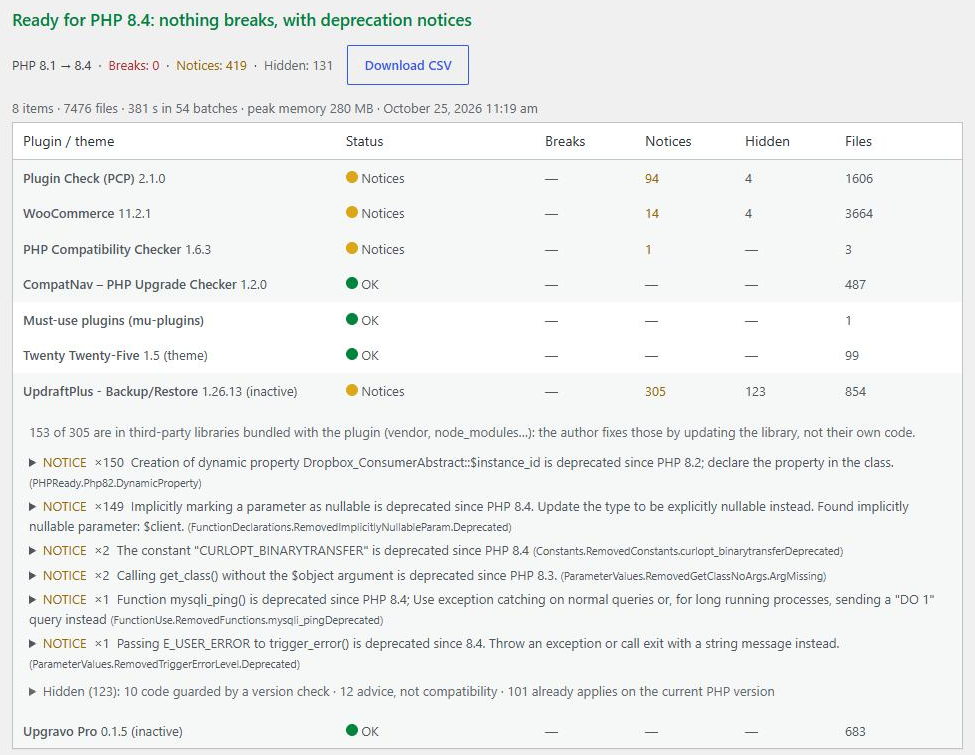
- Breaks vs deprecation notices: a removed function stops the site with a fatal error; a deprecation only writes a line in the error log. Upgravo keeps the two apart so you know what is urgent.
- What to do first: if the plugin that breaks has an update available, it says so. If it is inactive, it says it does not matter until you activate it.
- The verdict on the Plugins screen: after a scan, every plugin row shows “PHP 8.4: OK”, “PHP 8.4: works, 12 notices” or “PHP 8.4: 3 breaks”, with a link to the details. If a plugin was updated after the scan, it tells you which version was checked.
- Abandoned plugins: plugins not tested with the last three WordPress versions are flagged, using the data WordPress already downloads for updates. Optionally, Upgravo also asks WordPress.org whether each plugin was closed (for example for a security issue) or has not been updated in two years.
- How to fix, with code: for the most common problems (implicitly nullable parameters, removed extensions,
each(),create_function(),${var}in strings, dynamic properties, the PHP 8.5 casts…) each finding explains what changed in PHP and shows the code before and after, so you can fix your own code or send it to the plugin author. - Copy summary: one click copies a plain-text report (verdict, what breaks, what to do first) to paste in an email to your client or in a ticket to your host.
Fewer false alarms
A raw PHPCompatibility scan of the 20 most installed WordPress.org plugins (20,100 PHP files) reports 165 “errors” for PHP 8.4. Every one of them is code that never runs on PHP 8: old fallbacks behind function_exists(), extension_loaded() or a PHP version check. A checker that shows them all tells you that your site is broken when it is not.
Upgravo recognises those guards, but only when the guard names the exact function, constant or class it protects: function_exists( 'a' ) around a call to b() does not hide b(), and a call inside if ( ! function_exists( 'x' ) ) is still reported. Findings that only apply to the PHP version you already run are hidden too, because your site already lives with them. Nothing is thrown away: every hidden finding can be expanded, with the reason it was hidden.
Designed for any hosting
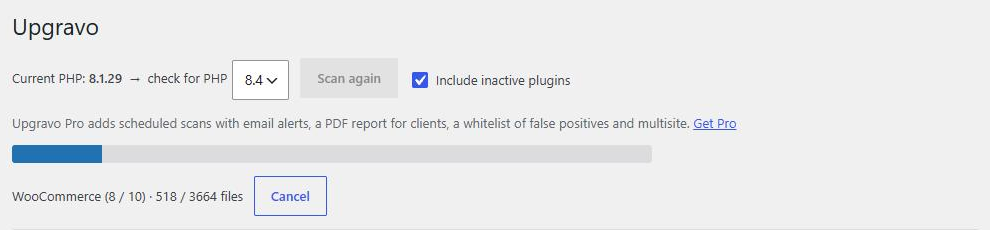
- Runs on shared hosting. The scan runs in short batches with a progress bar, so it never hits the 30-60 second request limit of shared hosts. Close the tab and come back: it resumes where it stopped.
- No
exec(), no shell, no external server. Your code never leaves your site. Nothing to sign up for, no license key to see results. - Covers the whole site: must-use plugins, drop-ins (
advanced-cache.php,object-cache.php,db.php…), the parent theme, and every class of WordPress core itself, so a plugin that extendsWP_WidgetorWC_Payment_Gatewayis checked properly instead of ignored. - Any upgrade path from PHP 7.4 to 8.1, 8.2, 8.3, 8.4 or 8.5: removed functions and extensions (
mysql_*,mcrypt,each(),create_function(),imap_*andpspell_*in PHP 8.4…), PHP 8.0 fatal errors, PHP 8.1–8.5 deprecations including dynamic properties (PHP 8.2), implicitly nullable parameters (PHP 8.4),'self::method'callables and the PHP 8.5 changes ((boolean)/(integer)casts, backticks,curl_close()…). - Site Health integration: the verdict shows up in Tools Site Health.
- WP-CLI:
wp upgravo scan --target=8.4 --format=jsonreturns exit code 1 if anything active breaks, so agencies can check 50 sites from a script. - CSV export of every finding, including the hidden ones and why they were hidden.
For freelancers and agencies
Hosts send the same email to all your clients: “your PHP version is going away”. Install Upgravo on each site, scan, and use Copy summary to answer the client with a list of what breaks and what to do first. The free plugin has no site limit.
Upgravo Pro adds what you need when you maintain many sites: scheduled scans with an email when a plugin update introduces an incompatibility, a PDF report with your name for the client, a whitelist of reviewed findings per plugin, and multisite (one scan for the whole network).
Built on PHPCompatibility
The analysis engine is PHPCompatibility (176 rules maintained by the PHP community since 2012) running on PHP_CodeSniffer, bundled inside the plugin, plus Upgravo’s own detectors for PHP 8.2 dynamic properties and relative callables. It reads code; it does not run it. A static scan cannot see problems that only appear at runtime, so treat “nothing breaks” as “nothing we can see breaks”, and keep a backup before any upgrade.
External services
By default Upgravo makes no external requests. It only uses the plugin data that WordPress itself already downloaded from WordPress.org when it checked for updates.
If you tick “Also check on WordPress.org whether each plugin is still maintained” on the Upgravo screen, Upgravo sends the folder name (slug) of each scanned plugin to the WordPress.org Plugin API (https://api.wordpress.org/plugins/info/1.2/) after a scan, to read whether the plugin was closed and when it was last updated. Nothing else about your site is sent. Answers are cached for 24 hours. The service is provided by WordPress.org, under its privacy policy. Untick the box to stop it.
Third-party libraries included
- PHP_CodeSniffer — BSD-3-Clause
- PHPCompatibility — LGPL-3.0-or-later
- PHPCSUtils — LGPL-3.0-or-later
Source code
The free plugin is developed in the open: https://github.com/nis-prog/upgravo (support stays in the WordPress.org forum).
Screenshots



Installation
- Install from Plugins Add New (search for “Upgravo”), or upload the
upgravofolder towp-content/plugins/. - Activate it.
- Go to Upgravo in the admin menu, pick the PHP version you plan to upgrade to, and click Scan plugins and theme.
- Read the verdict. The Plugins screen also shows the result next to each plugin.
FAQ
-
How do I run a PHP upgrade check on my WordPress site?
-
Install Upgravo, choose 8.4 as the target and run a scan. It checks every active plugin, the theme (and its parent), must-use plugins and drop-ins against PHP 8.4, and tells you whether anything active breaks. It takes one to two minutes on a typical site.
-
How do I update PHP in WordPress without breaking my site?
-
- Take a backup. 2. Scan with Upgravo against the new PHP version. 3. Update or replace the plugins that break; the “What to do first” box lists them in order. 4. Change the PHP version in your hosting panel (ideally on a staging copy first). 5. Browse the site and check the error log for a day.
-
Which PHP version should I upgrade to?
-
The newest one your host offers and your plugins support. Scan against it: if nothing breaks, go for it. If something breaks, scan against the version below and compare. PHP 8.1 and older no longer get security fixes, and PHP 8.2 stops on 31 December 2026.
-
What happens if I upgrade PHP and a plugin is not compatible?
-
If the plugin uses a function that no longer exists, the site shows a fatal error (“There has been a critical error on this website”) on the pages where that code runs, sometimes the whole site and the admin. Deprecation notices do not break anything; they only fill the error log. Upgravo tells you which one you have.
-
My host says my PHP version is end of life. What do I do?
-
Scan with Upgravo against the version your host proposes, fix what breaks, then upgrade. If you manage the site for a client, the Copy summary button gives you a text to send them.
-
Is my theme checked too?
-
Yes: the active theme and, if it is a child theme, its parent.
-
Yes. Upgravo reads the code that is installed on your site, so it works for plugins bought outside WordPress.org and for code written for you, not only for plugins listed in a directory.
-
Does it send my code anywhere?
-
No. Everything runs on your server, inside WordPress. The only optional request is the maintenance check described under “External services”, which sends plugin folder names, never code.
-
Does it need `exec()` or shell access?
-
No. That is why it works on SiteGround, Kinsta, WP Engine and other hosts that disable
exec(). -
How long does a scan take?
-
About 15 ms per PHP file. A site with WooCommerce and a dozen plugins (5,000 files) takes one to two minutes. The scan runs in batches of a few seconds each, so it is safe on any host.
-
What is the difference between “Breaks” and “Notices”?
-
“Breaks” means a fatal error on the target PHP version: a function that no longer exists, an argument order that is no longer accepted. “Notices” means the code still works but PHP marks it as deprecated and logs a message; it will break in a future version.
-
Because they would mislead you. Hidden findings are code that only runs on old PHP versions (guarded by
function_exists()orversion_compare()), things that already apply to the PHP version you run today, analyzer housekeeping, and style advice. You can expand them and see the reason for each one. -
Is “nothing breaks” a guarantee?
-
No. Upgravo reads code without running it, so it cannot see problems that only appear at runtime (for example code built from strings or loaded from the database). It removes the guesswork, not the backup.
-
Does it check inactive plugins?
-
By default only active plugins, the active theme (and its parent), mu-plugins and drop-ins. Tick “Include inactive plugins” to scan everything.
-
Does it work on multisite?
-
Yes, scanning requires a super admin because plugins belong to the whole network. Upgravo Pro adds a single network screen that scans what every site uses.
-
Can I run it from the command line?
-
Yes:
wp upgravo scan --target=8.4 --inactive --format=table. Exit code 1 means something active breaks. -
Is there a Pro version?
-
Yes. Upgravo Pro adds scheduled scans with an email when an update introduces an incompatibility, a PDF report for clients, a whitelist of false positives per plugin, and multisite support. Everything in the free plugin stays free. Details at phpready.com.
Reviews
There are no reviews for this plugin.
Contributors & Developers
“Upgravo – PHP Compatibility Checker & Scanner” is open source software. The following people have contributed to this plugin.
Contributors
Translate “Upgravo – PHP Compatibility Checker & Scanner” into your language.
Interested in development?
Browse the code, check out the SVN repository, or subscribe to the development log by RSS.
Changelog
0.1.12
- Plugin name updated to “Upgravo – PHP Compatibility Checker & Scanner”. No change in behaviour.
0.1.11
- The Plugins screen shows each plugin’s result next to it (“PHP 8.4: OK”, “works, 12 notices” or “3 breaks”), with a link to the details and a note if the plugin was updated after the scan.
- Maintenance signals: plugins not tested with the last three WordPress versions, and plugins whose latest version requires a newer PHP than the target, are flagged using the data WordPress already has.
- Optional check on WordPress.org (off by default): plugins closed by the directory or not updated in two years are flagged.
- Copy summary: a plain-text report to paste in an email or a hosting ticket.
- How to fix: the most common findings now explain what changed in PHP, with a before/after code example.
- Readme rewritten with the questions people ask before a PHP upgrade.
0.1.10
- Guard detection is now tied to the exact function, constant or class it protects.
function_exists( 'a' )around a call tob()no longer hidesb(). - Negated checks are understood: a call inside
if ( ! function_exists( 'x' ) )is reported, theelsebranch is treated as guarded. - Guards written over several lines of an
ifcondition are recognized. - Thanks to PeepSo for the test cases that prompted these checks.
0.1.9
- Plugin name and description now say what it is: a PHP version compatibility checker. No change in behaviour.
0.1.8
- PHP 8.5 can be chosen as the target version.
- Inline
phpcs:ignore/phpcs:ignoreFilecomments in scanned plugins no longer hide PHP compatibility findings. - On multisite, scanning requires a super admin (plugins and must-use plugins belong to the whole network).
- A slow file can no longer let the scan lock expire mid-batch.
- Uninstall removes Upgravo data from every site of a multisite network.
0.1.7
- After a finished scan, the Upgravo screen asks once for a review on WordPress.org (Maybe later hides it for 14 days; Don’t ask again hides it for good).
0.1.6
- Bundled PHP_CodeSniffer reduced to the parts the scanner runs (unused coding-style standards removed).
0.1.5
- Renamed to Upgravo. Same scanner and settings; the WP-CLI command is now
wp upgravo scan.
0.1.4
- Bundled PHP_CodeSniffer updated to 4.0.4.
- Development files (tests, docs, build scripts) removed from the bundled libraries.
- Translation files are no longer bundled; translations are delivered by translate.wordpress.org.
0.1.3
- Files under a plugin’s
lib/folder are no longer assumed to be third-party libraries (in many plugins that folder holds the author’s own code). Onlyvendor/,node_modules/and similar folders count as bundled libraries.
0.1.2
- A file that does not compile on the current PHP version is no longer analyzed (the analyzer produced false findings on such files); it is listed as not checked with the line and the parser message.
- If the analyzer aborts on a file, that file is listed as not checked instead of counting as clean.
- Very large files: the scanner now asks the server for the extra memory the file needs; if the host allows it, the file is analyzed instead of skipped.
0.1.1
- The scan lock now carries a per-request token, so a long request (for example a cron run) can never release a lock held by another request.
- Fixed a spurious “no scan in progress” message when another tab or process finished the last batch.
- WP-CLI respects the scan lock and reports clearly if the scan was cancelled from the admin screen.
- Hooks for extensions (classification filter, result groups, network mode); a “Pro version” link.
0.1.0
- First public release.